


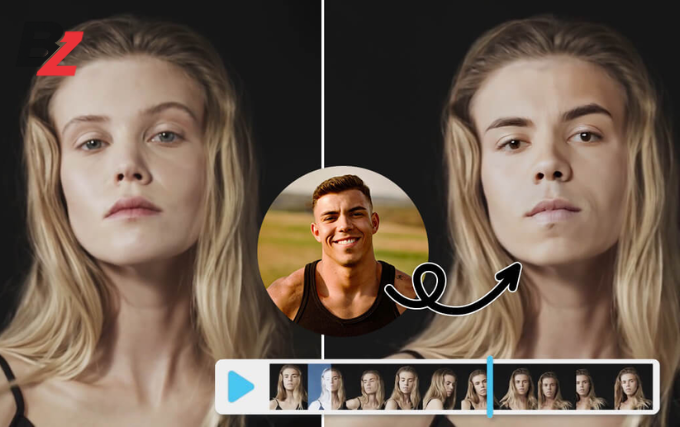
Creating engaging videos no longer requires complex editing skills or expensive software. One of the fastest-growing trends in video creation today is face swapping, where creators can digitally replace a face in a video with another while maintaining realistic expressions, lighting, and motion. From social media creators and marketers to educators and storytellers, online face swap video tools are helping people produce attention-grabbing content in minutes.
These tools rely on AI-powered facial mapping and motion tracking to generate natural-looking results without manual frame-by-frame editing. As cloud-based platforms, they also eliminate the need for heavy downloads or advanced technical knowledge.
In this blog, we’ll explore seven online face swap video tools for fast video creation, starting with Invideo, followed by other notable platforms worth exploring.
1. Invideo
Invideo has steadily evolved into a versatile platform for modern video creation, and its face swap capability is a natural extension of that ecosystem. Designed for speed and ease of use, invideo allows creators to experiment with face swapping without navigating complicated workflows.
How Invideo Handles Face Swapping
The process is straightforward. Upload the video you want to recreate, add a photo of the face you want, and let invideo handle the transformation automatically. Within seconds, the platform generates a face swap video that aligns facial expressions, head movements, and lighting with impressive consistency.
This streamlined approach removes much of the friction associated with traditional video editing. Instead of working with multiple layers or manually tracking faces, users can rely on AI to manage the technical complexity in the background.
Realistic Results Without Visual Flicker
One of the biggest challenges with face swapping is maintaining realism throughout the clip. Invideo focuses on delivering hyper-realistic, flicker-free results, making the output suitable for short-form content, explainers, and creative experiments. The swapped face blends naturally with the original footage, reducing visual distractions.
Invideo is often mentioned alongside the rise of the AI video maker app ecosystem, where automation helps creators move from idea to finished video faster while still retaining creative flexibility.
2. DeepSwap
DeepSwap is a browser-based tool designed specifically for AI-powered face swapping across videos, images, and GIFs. Its clean interface makes it approachable for users who want fast results without unnecessary steps.
Key Capabilities
DeepSwap uses deep learning to identify facial landmarks and apply accurate replacements frame by frame. Users simply upload their source video, add a face image, and allow the system to process the swap automatically.
The platform supports longer video durations than many similar tools, making it suitable for storytelling clips and extended scenes. Processing time depends on video length, but the results are generally consistent for creative use.
Ideal Use Cases
DeepSwap is commonly used for parody content, entertainment videos, and experimental storytelling. It works well for creators who want to test visual ideas quickly without committing to complex software.
3. Reface
Reface became widely popular for bringing face swapping into mainstream short-form content. While it initially focused on images and GIFs, it has expanded to include video-based face swaps.
Strengths in Short Video Content
Reface performs best with short clips where expressive facial movement is key. Its AI accurately maps facial expressions, making it a strong option for reaction videos, memes, and social media posts.
Simple User Experience
The platform emphasizes ease of use. Users upload a face image, choose a video, and preview the result within minutes. This makes Reface appealing to beginners exploring AI-driven video effects.
4. FaceMagic
FaceMagic offers online face swapping with a focus on accessibility and creativity. One of its notable features is the ability to swap multiple faces within a single video.
Multi-Face Support
This capability is especially useful for group scenes, skits, or videos involving multiple characters. FaceMagic automatically detects faces and applies swaps without requiring manual adjustments.
Creative Applications
FaceMagic is often used for fun, character-based content and visual experimentation. While it may not target professional production workflows, it works well for quick creative concepts.
5. SwapFace
SwapFace is a straightforward AI face swap tool designed for both videos and images. It focuses on maintaining facial alignment and minimizing distortions during movement.
Technical Accuracy
The tool tracks facial features consistently across frames, helping preserve realism even when the subject changes angle or expression. This makes it suitable for videos with moderate motion.
Practical Use Cases
SwapFace is commonly used for concept videos, demo visuals, and personal projects where speed and simplicity matter more than advanced customization.
6. FacePlay
FacePlay combines face swapping with stylized visuals and cinematic effects. While it leans toward entertainment, it shows how face swap technology can be enhanced with visual storytelling elements.
Expressive Visual Styles
FacePlay applies dramatic lighting, motion effects, and themed visuals to elevate the final output. This makes it popular for creators looking to produce visually striking short videos quickly.
Fast Content Turnaround
The platform processes videos rapidly, making it well suited for trend-driven content, social media challenges, and creative experiments.
7. Vidnoz Face Swap
Vidnoz Face Swap is part of a larger AI-powered video ecosystem. Its online face swap feature allows users to create swapped videos directly in the browser.
Easy Workflow
Users upload a video and a face image, then let the platform generate the swapped result automatically. The interface is designed for minimal learning, making it accessible even for first-time users.
Flexible Output Options
Vidnoz Face Swap works well for short presentations, creative clips, and experimental video ideas. It’s often used alongside other AI video tools to accelerate content creation.
Why Online Face Swap Video Tools Are Growing Rapidly
The popularity of online face swap tools reflects a broader move toward automation in content creation. AI now handles complex tasks such as facial tracking, blending, and rendering, allowing creators to focus on ideas rather than editing details.
Speed and Convenience
Cloud-based platforms remove the need for high-end hardware or advanced software. With just an internet connection, users can experiment with face swapping anytime, anywhere.
Creative Flexibility
By lowering technical barriers, these tools open up new creative possibilities. From storytelling and parody to educational visuals, face swapping is becoming a versatile creative technique.
Choosing the Right Face Swap Tool
Different tools serve different creative needs. Some prioritize realism, others emphasize speed or visual effects.
Creators looking for a smooth, low-friction workflow often gravitate toward platforms like invideo. Those focused on expressive, short-form content may prefer tools such as Reface or FacePlay, while experimentation-focused users may explore options like DeepSwap or SwapFace.
Understanding your content goals will help you select the most effective tool for fast video creation.
Final Thoughts
Face swap technology has evolved far beyond novelty use cases. Today, it plays a meaningful role in modern video workflows, enabling creators to produce engaging content faster than ever before.
As AI continues to improve, face swapping will become even more seamless, realistic, and creative. Whether you’re experimenting with visual storytelling or optimizing your content process, online face swap video tools are becoming an essential part of the creator toolkit.
